GeoGuessr AI Models: ChatGPT-5, Claude, Gemini & DeepSeek Compared
TrustGeo offers 5 AI models for GeoGuessr analysis: ChatGPT-5, ChatGPT-4, Claude Sonnet, Gemini Pro, and DeepSeek R1. Compare models and choose the best AI for your gameplay.
Scoring 5,000 points on every single round feels great — for about two games. After that, it starts to look strange to your friends, your opponents and the game itself. Score Range is the TrustGeo feature that solves this: you decide which scores you want, and every guess lands inside that range.
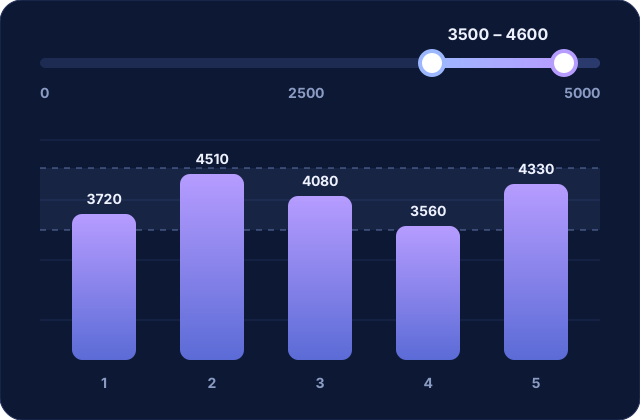
Score Range is a slider with two handles: a minimum score and a maximum score, from 0 to 5,000 points. When TrustGeo places your pin, it doesn't drop it on the exact location. It picks a spot at the right distance so your score falls somewhere between the two values you chose.
For example, with a range of 3,500 to 4,600 points, one round might give you 4,080, the next 3,720 and the one after 4,510. Your results move up and down like a real player's, but you never fall behind.
In GeoGuessr's classic mode, your score depends on how far your pin is from the real location: the closer you are, the more points you get, up to 5,000. TrustGeo knows the exact location, so it can work backwards: it calculates how far away the pin should be to give a score inside your range, then places it in a random direction at that distance.
The side panel shows you the score band and the matching distance, for example "3,500 – 4,600 pts, about 124 to 532 km off" on a world map. After each pin, a message tells you roughly how many points you can expect.
Score Range is part of TrustGeo Pro, together with Auto Find, AutoPlace and Bot Mode. You can try TrustGeo for free first — here is how to install it.
TrustGeo offers 5 AI models for GeoGuessr analysis: ChatGPT-5, ChatGPT-4, Claude Sonnet, Gemini Pro, and DeepSeek R1. Compare models and choose the best AI for your gameplay.
Auto Find automatically detects your GeoGuessr location when each round loads. No clicking needed — instant coordinates, map, and AI analysis. Free Chrome extension.
AI can now guess a GeoGuessr location from a single image. Learn how AI geolocation works, its limits, and how TrustGeo combines exact coordinates with AI analysis.
Install TrustGeo in one click and try it on your next GeoGuessr game.
Add to Chrome — it's free